1. Image Layering in Docker
What is image layering?
A Docker image is built layer by layer.
Each instruction in a Dockerfile (FROM, COPY, RUN, etc.) creates a new immutable layer.
Think of it like:
- Layer 1: Base OS + JDK
- Layer 2: App dependencies
- Layer 3: Application code
- Layer 4: Runtime command
Docker caches layers, so unchanged layers are reused in future builds.
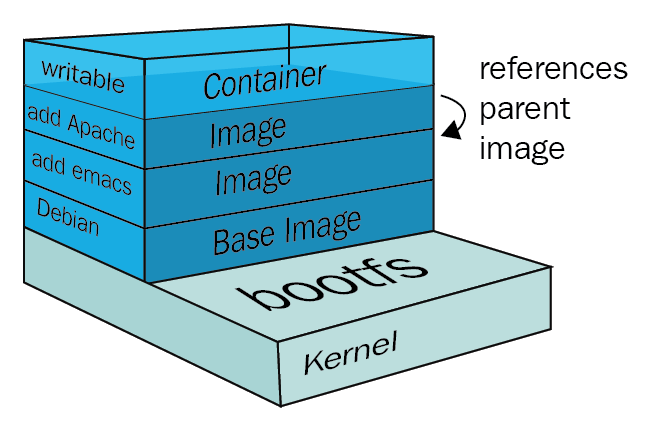
Layering in Dockerfile
FROM maven:3.9.11-eclipse-temurin-25 AS build   # Layer 1
WORKDIR /app                                   # Layer 2
COPY pom.xml .                                 # Layer 3
RUN mvn dependency:go-offline -B                # Layer 4
COPY src ./src                                 # Layer 5
RUN mvn clean package -DskipTests               # Layer 6
Key insight:
pom.xmlis copied beforesrc/- Maven dependencies are downloaded only when pom.xml changes
- Code changes (
src) don’t invalidate dependency layers
This is intentional layer optimization.
Why image layering matters
Benefits
- Faster rebuilds
- Smaller downloads
- Better CI/CD performance
Example
If you change one Java class:
- Docker reuses layers 1–4
- Only layers 5–6 are rebuilt
Without layering awareness → every build would redownload Maven dependencies.
When image layering is critical
- Large Java / Spring Boot projects
- CI pipelines with frequent commits
- Teams working on the same base image
- Monorepos
2. Multi-Stage Builds
What is a multi-stage build?
Multi-stage builds allow you to:
- Use one image to build
- Use another image to run
- Copy only what you need between stages
This avoids shipping:
- Maven
- Source code
- Build tools
- Temporary files

Multi-stage build in your Dockerfile
Build stage
FROM maven:3.9.11-eclipse-temurin-25 AS build
Contains:
- Maven
- JDK
- Full source code
.m2cache
Produces:
/app/target/myapp.jar
Runtime stage
FROM amazoncorretto:25-jdk
Contains:
- Only JDK
- No Maven
- No source code
COPY --from=build /app/target/*.jar app.jar
Only the final JAR is copied.
Why multi-stage builds are powerful
Without multi-stage
- Image size: 700–900 MB
- Security risk (build tools exposed)
- Slower startup & pull time
With multi-stage
- Image size: 200–300 MB
- Smaller attack surface
- Faster deployments
Real-world use cases
- Spring Boot microservices
- Kubernetes deployments (faster pod startup)
- Production images with security compliance
- CI pipelines (GitHub Actions, Jenkins)
3. BuildKit Optimization
What is BuildKit?
BuildKit is Docker’s modern build engine that:
- Improves caching
- Runs steps in parallel
- Skips unnecessary work
- Optimizes dependency handling
Enabled via:
export DOCKER_BUILDKIT=1
or by default in modern Docker versions.
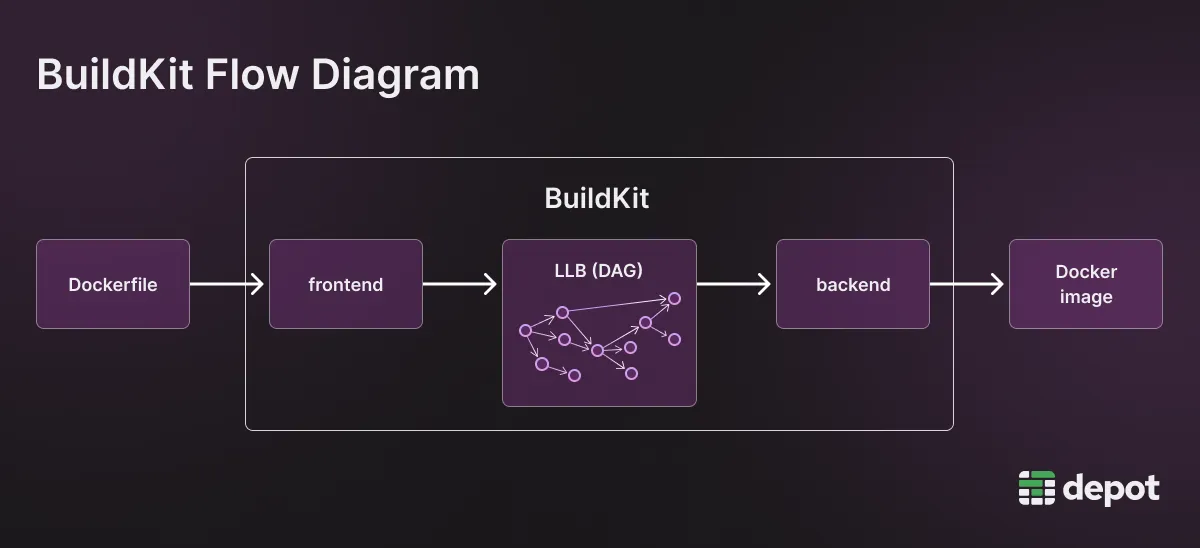
How BuildKit optimizes your Dockerfile
1. Smarter caching
RUN mvn dependency:go-offline -B
BuildKit:
- Knows this step depends only on
pom.xml - Reuses it aggressively across builds
- Even across different branches
2. Parallel execution
BuildKit can:
- Prepare later stages while earlier layers build
- Optimize multi-stage dependency graphs
Classic Docker:
- Strictly sequential BuildKit:
- Dependency-aware execution
3. Reduced rebuild scope
If only src/ changes:
- BuildKit reuses dependency layers
- Rebuilds only the package step
- Final image is rebuilt efficiently
Advanced BuildKit features (real-world)
Even though not used here, BuildKit enables:
- Secret mounts (
--mount=type=secret) - Cache mounts for Maven (
.m2) - SSH forwarding for private repos
Example (conceptual):
RUN --mount=type=cache,target=/root/.m2 mvn package
Huge speedup in CI systems.
When to use what
- Always design Dockerfiles with layering in mind
- Always use multi-stage builds for Java apps
- Enable BuildKit in CI/CD and local builds
- Teach juniors to copy
pom.xmlbeforesrc/